Get Intolerance.app on Your Phone
Intolerance.app is designed for mobile use. Scan the QR code below with your phone's camera to open the app instantly.
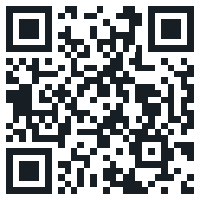
Point your phone's camera here
Your camera app will recognize the QR code and offer to open the link.
Or type this URL on your phone:
app.intolerance.app Why mobile only?
Intolerance.app is designed for on-the-go use — snap photos of your meals, log symptoms as they happen, and get push notifications for logging reminders. The mobile experience is optimized for quick, daily interactions that make tracking effortless.
How to Install on Your Phone
iPhone (Safari)
- 1. Open app.intolerance.app in Safari
- 2. Tap the Share button (square with arrow)
- 3. Scroll down and tap "Add to Home Screen"
- 4. Tap "Add" — done!
Android (Chrome)
- 1. Open app.intolerance.app in Chrome
- 2. Tap the three-dot menu (top right)
- 3. Tap "Install app" (or "Add to Home screen")
- 4. Confirm — done!
Open Intolerance.app
Tap the button below to launch the app in your browser. For the best experience, install it to your home screen.
Open Intolerance.appFree to start · No credit card required
Install to Home Screen
For push notifications, offline support, and a native app feel — add Intolerance.app to your home screen:
1. Tap the Share button (square with arrow) at the bottom of Safari
2. Scroll down and tap "Add to Home Screen"
3. Tap "Add" — the app icon will appear on your home screen
1. Tap the three-dot menu (top right of Chrome)
2. Tap "Install app" (or "Add to Home screen")
3. Confirm — the app icon appears on your home screen
1. Open the browser menu
2. Look for "Add to Home Screen" or "Install"
3. Confirm — the app icon will appear on your home screen